Hi again.
Today we're gonna talk about best (IMO) digital audio workstation called Reaper.
I used to use FL Studio as my main DAW. It has a lot of advantages but there are couple of dissapointments:
1) Appearance. Beautiful but hard and sumetimes unuseful interface (for instanse I want to open several plugins at the moment but they take a lot of workspace)
2) Pattern system. I don't usually do club or electro music so I don't need a lot of looping phrases in my mixes. And this option forces me to create new and new patterns. And it's getting boring.
3) System Requirements. It's easy to listen and mix light brojects. But If you want to use a lot of plugins hen get ready to get smashed (yes!) by memory lack. I have 2GB RAM and want to upgrade but at the moment it's hard to use FL for big projects.
And one day I discovered Reaper. Simple but very-very-very powerful program to record your songs and make them sound as good as you want them to! Here are some reasons why I prefer Reaper:
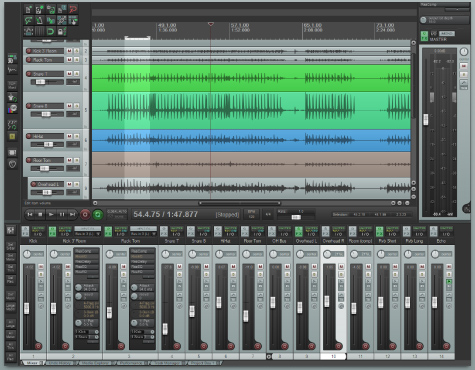
1) Usability. No patterns, no disturbing interface - everything is simple as possible! Playlist on the top, mixer on the bottom and nothing more that could make is look bulky.
2) Requirements. My track "Metal Factory" is the first song that was created by Reaper. It has 2 guitar tracks, kick, top snare, bottom snare, hi-hat, overheads, room and etc tracks. About 13 channels at all + master track. Every channel have inserts. And I mixed this song only in one session without any crashes, critical reboots and other. Stability - one of the greatest advantages of Reaper.
3) Price. Full version of FL costs $300. But full version of Reaper costs only $60. For better perfomance.
4) Comfortable Piano Roll. Not so important but very useful thing. You can tweak velocity or other parameters of note just by hovering your note and scrolling mouse wheel up or down.
But everything has "dark side of the moon".
For example I like Peavey ReValver MKIII.V VST Plugin for my guitars. But there are problems with it in Reaper. Plugin resets everytime when you open plugin window. So I just tweak my amp settings and never change them during current session.
I hope this article helped you a bit. Feel free to ask and comment!
_____
unLatem.
Today we're gonna talk about best (IMO) digital audio workstation called Reaper.
I used to use FL Studio as my main DAW. It has a lot of advantages but there are couple of dissapointments:
1) Appearance. Beautiful but hard and sumetimes unuseful interface (for instanse I want to open several plugins at the moment but they take a lot of workspace)
2) Pattern system. I don't usually do club or electro music so I don't need a lot of looping phrases in my mixes. And this option forces me to create new and new patterns. And it's getting boring.
3) System Requirements. It's easy to listen and mix light brojects. But If you want to use a lot of plugins hen get ready to get smashed (yes!) by memory lack. I have 2GB RAM and want to upgrade but at the moment it's hard to use FL for big projects.
And one day I discovered Reaper. Simple but very-very-very powerful program to record your songs and make them sound as good as you want them to! Here are some reasons why I prefer Reaper:
1) Usability. No patterns, no disturbing interface - everything is simple as possible! Playlist on the top, mixer on the bottom and nothing more that could make is look bulky.
2) Requirements. My track "Metal Factory" is the first song that was created by Reaper. It has 2 guitar tracks, kick, top snare, bottom snare, hi-hat, overheads, room and etc tracks. About 13 channels at all + master track. Every channel have inserts. And I mixed this song only in one session without any crashes, critical reboots and other. Stability - one of the greatest advantages of Reaper.
3) Price. Full version of FL costs $300. But full version of Reaper costs only $60. For better perfomance.
4) Comfortable Piano Roll. Not so important but very useful thing. You can tweak velocity or other parameters of note just by hovering your note and scrolling mouse wheel up or down.
But everything has "dark side of the moon".
For example I like Peavey ReValver MKIII.V VST Plugin for my guitars. But there are problems with it in Reaper. Plugin resets everytime when you open plugin window. So I just tweak my amp settings and never change them during current session.
I hope this article helped you a bit. Feel free to ask and comment!
_____
unLatem.